
How to Estimate AI Costs One Task at a Time
How to budget for AI before launch and measure production costs, including cases that require human judgment.
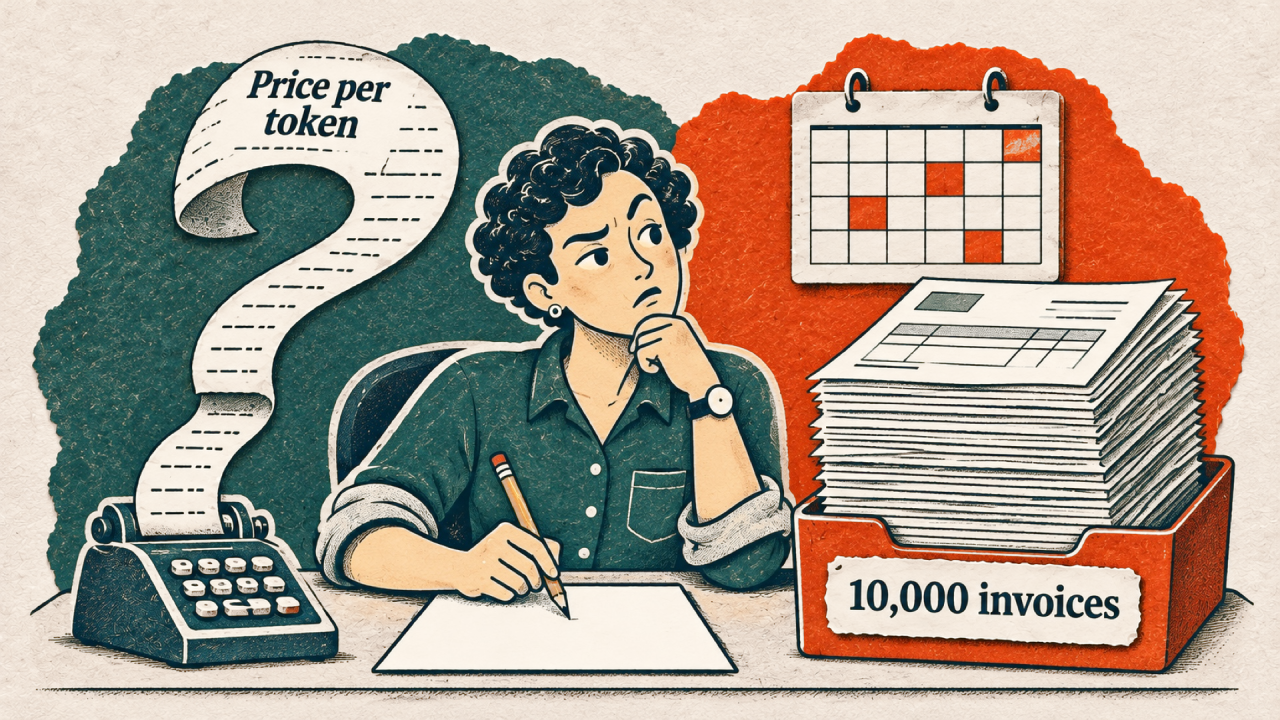
“What should we budget for tokens if we use AI to triage 20,000 support tickets a month?” Imagine getting that question before your team has built a prototype. Which model would you price, and how much reasoning effort would you give it? Even after you choose, how many model calls and tool calls will it take to route one ticket correctly? Across those model calls, estimate how many input tokens the model reads and how many output tokens it generates. If a ticket takes two tries, both count toward the bill.
What should we budget for tokens if we use AI to triage 20,000 support tickets a month?
Pick up a few tickets your team has already handled. Some went straight to the right team. Others needed a troubleshooting guide or a check against an open incident. Break the job into tasks, count how often each one comes up, and borrow rates from similar work for a first estimate. In a pilot, give each candidate model and reasoning level the same tickets. Divide the model spend across all attempts by the number of correct handoffs.
This study measured 15 tasks across five workflows using GPT-6.2 Sol at medium reasoning effort. Each workflow included four complexity levels: Routine, Standard, Complex, and Advanced. The number of visible model steps and tool calls varied by task and by complexity tier. With that setup and the assumed ticket mix, rates from comparable shipment and project tasks put service desk triage at about $1,156 a month in model usage. To measure a task, start with one supplier invoice.
From token usage to a monthly cost estimate
To measure an existing workflow, start with its token usage. To estimate a new one, start with the expected work and trace it back to the tokens it will take.
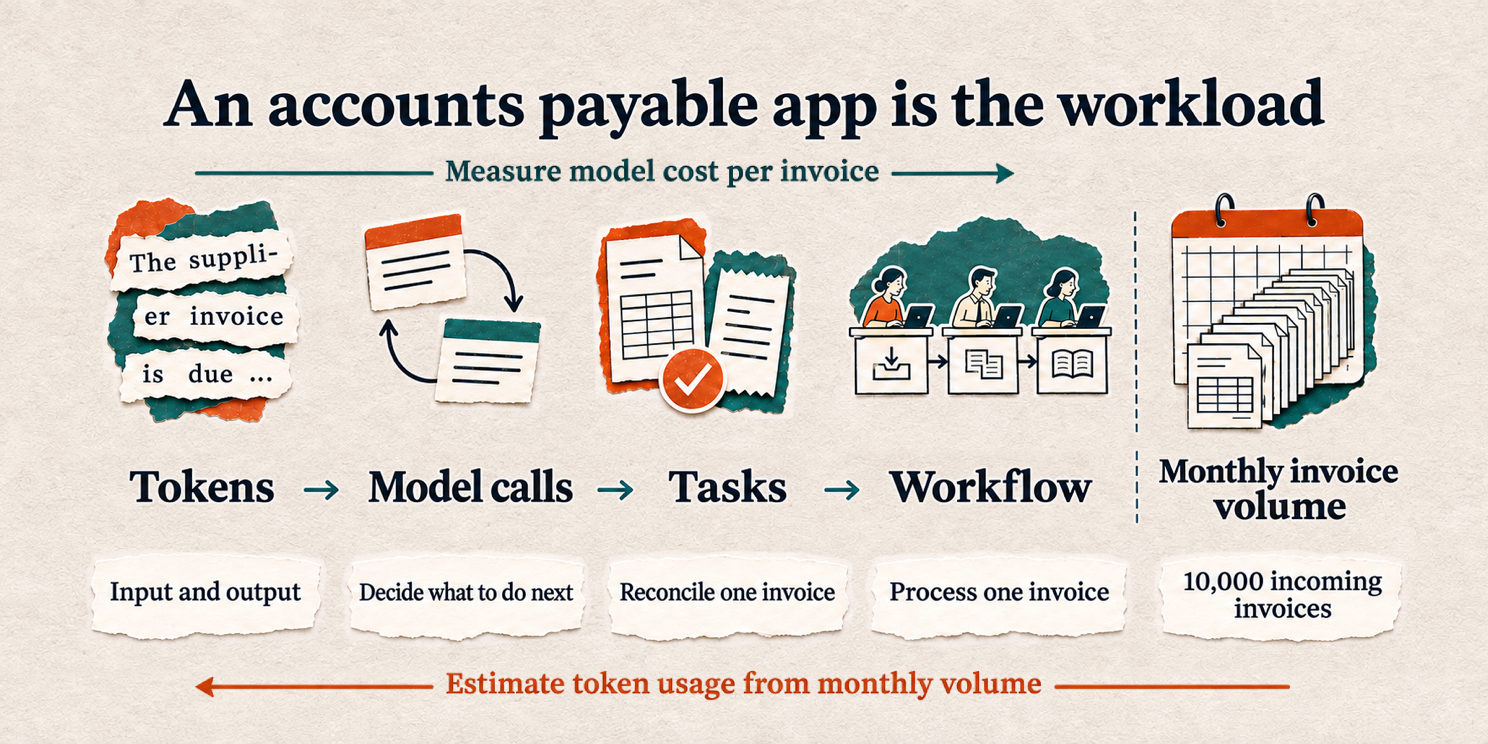
The accounts payable app processes one invoice per workflow run. Its monthly volume is 10,000 incoming invoices.
The accounts payable app is the workload. Its invoice workflow takes each invoice through extraction, reconciliation, and payment of the authorized amount. If 10,000 invoices arrive in a month, the monthly volume is 10,000 invoices. A retry adds processing cost for the same invoice.
An AI agent can ask a model what to do and use tools to act on the answer. When an invoice arrives, the agent sends it to the model. That’s a model call. If the model asks whether the goods arrived, the agent looks up a warehouse receipt. That’s a tool call. The model then uses the receipt to work out what the supplier is owed. Its usage is priced in tokens, the small pieces of text it reads and generates.
Suppose the supplier bills $100, but only $70 of goods arrived. Each of these three tasks ends with something another person or system can use.
- Extract the invoice. Hand over the supplier, invoice ID, line items, and a checked total of $100. Someone can verify that result against the document before a purchase order ever enters the picture.
- Reconcile the amount due. Match the lines to the order and receiving records. The warehouse accepted $70 of goods. Hand over $70 payable and $30 disputed, with a receipt explaining the difference.
- Post and verify. Check the approval, post the $70, and open the $30 dispute. Read both records back. A ledger entry and a linked dispute give the team evidence that this invoice is finished.
You can measure an invoice’s cost from the bottom up. Each model call reads input tokens and produces output tokens. If reconciliation needs a warehouse lookup, the receipt becomes part of the input to the next model call. Add up the token charges across all calls in one invoice workflow to get the model cost of processing that invoice.
To budget for a new workload, work backward. Start with the accounts payable app and estimate how many invoices it will receive each month. Which kinds of invoices do you expect, and which tasks will each kind trigger? Try a few representative invoices. Count the model calls each task needs, the tools it uses, and the input and output tokens those calls consume. Apply the token prices to get a cost per invoice for each kind, then multiply by each kind’s expected monthly volume.
What different tasks cost
The study used fictional records in systems the agent could read and update. It tested supplier invoices, missed shipments, project feasibility, travel reimbursements, and employee policy questions. Each workflow had three tasks.
A standalone test gave one task the information it needed to begin. An end-to-end test started with the incoming job and passed each task’s actual output to the next. An incomplete handoff could affect everything that followed.
A case is one situation, such as the partial delivery. Its test records include the $100 invoice and the $70 receipt. Before running the case, define what success looks like. Here the evaluation checks the ledger for exactly one $70 posting and a linked $30 dispute. Saying “done” is easy. Those two records prove it.
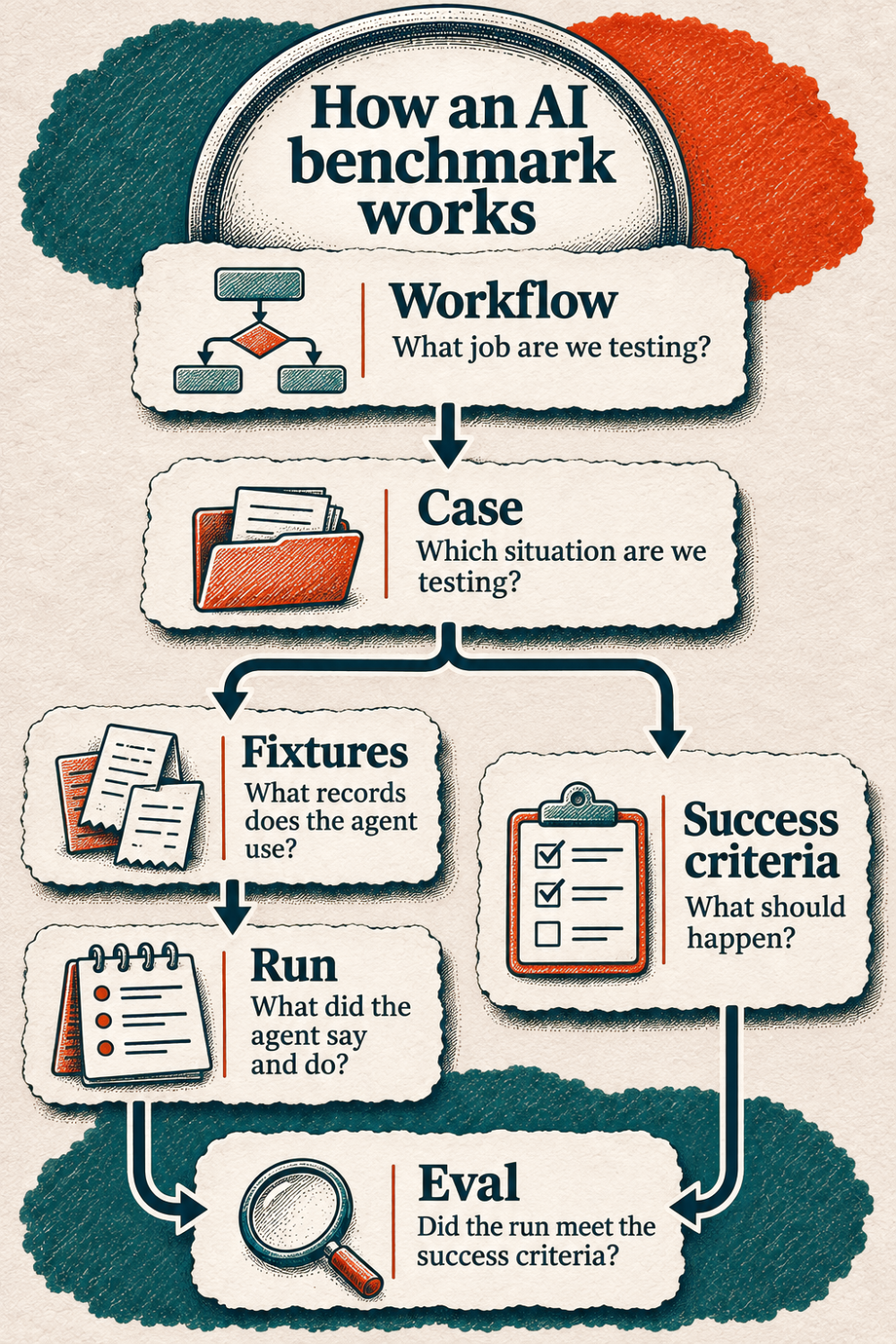
How an AI benchmark works.
The four tiers describe what the agent has to resolve. A Routine invoice might match one line to one receipt. Standard adds a decision about a partial delivery. Complex can require applying a credit to the right amended line. In an Advanced case, a ledger write may succeed just before the system times out. The agent has to check what posted before deciding whether to retry.
The table shows average model cost for one standalone attempt, in U.S. cents. To make the cases comparable, we price every input token at the same rate, even when caching would earn a discount. A harder case can still cost less if the system supplies the evidence in fewer steps.
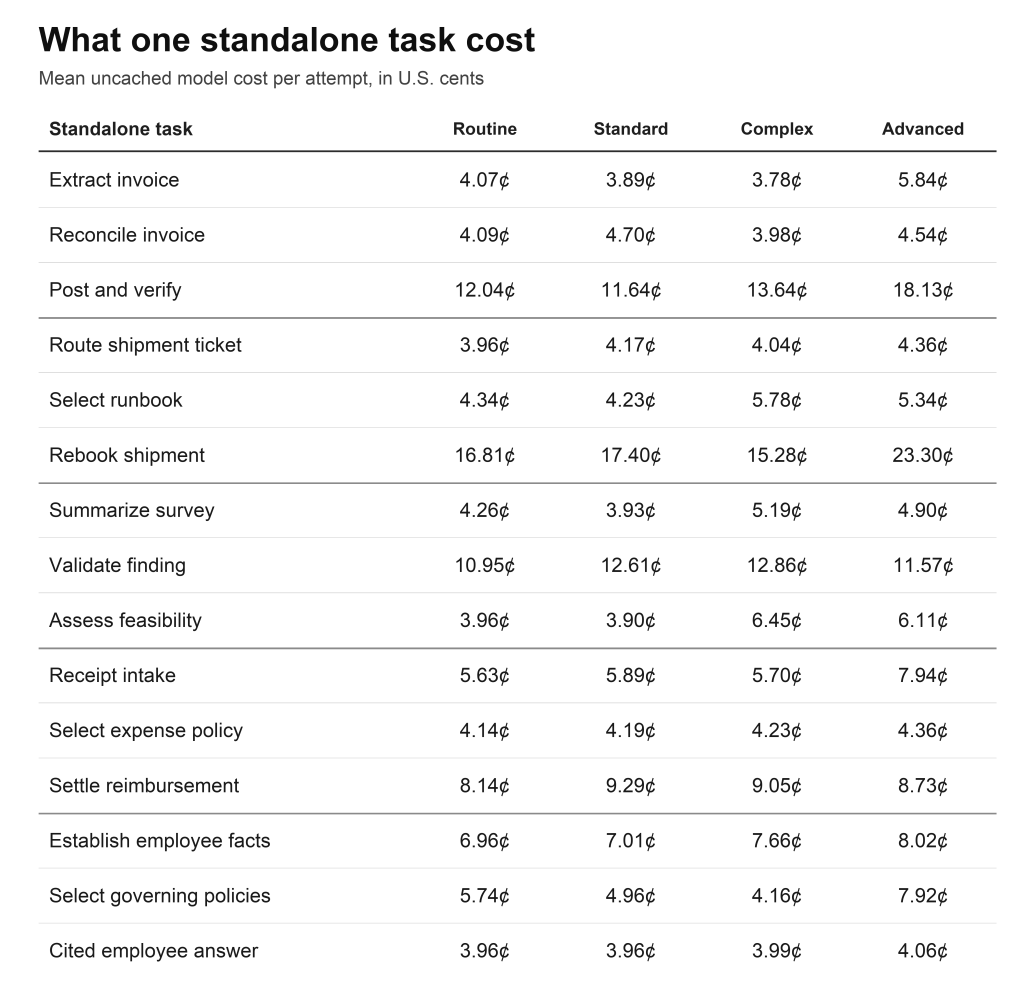
Standalone costs for 15 tasks across four tiers. Each cell is the mean uncached cost in U.S. cents.
Two Routine tasks on the same missed shipment illustrate the spread. Routing the ticket averaged 3.96¢. Booking a replacement pickup averaged 16.81¢.
Why rebooking costs more than routing
For routing, the model asked for the ticket, the agent fetched it, and the model chose the shipping team. Each of the nine Routine attempts took one tool call and two visible model steps.
Rebooking meant finding an offer, reserving the pickup, and checking the booking. The nine Routine attempts took 6 to 12 tool calls, averaging 9.8. The table counts each tool request, including requests to discover available resources.
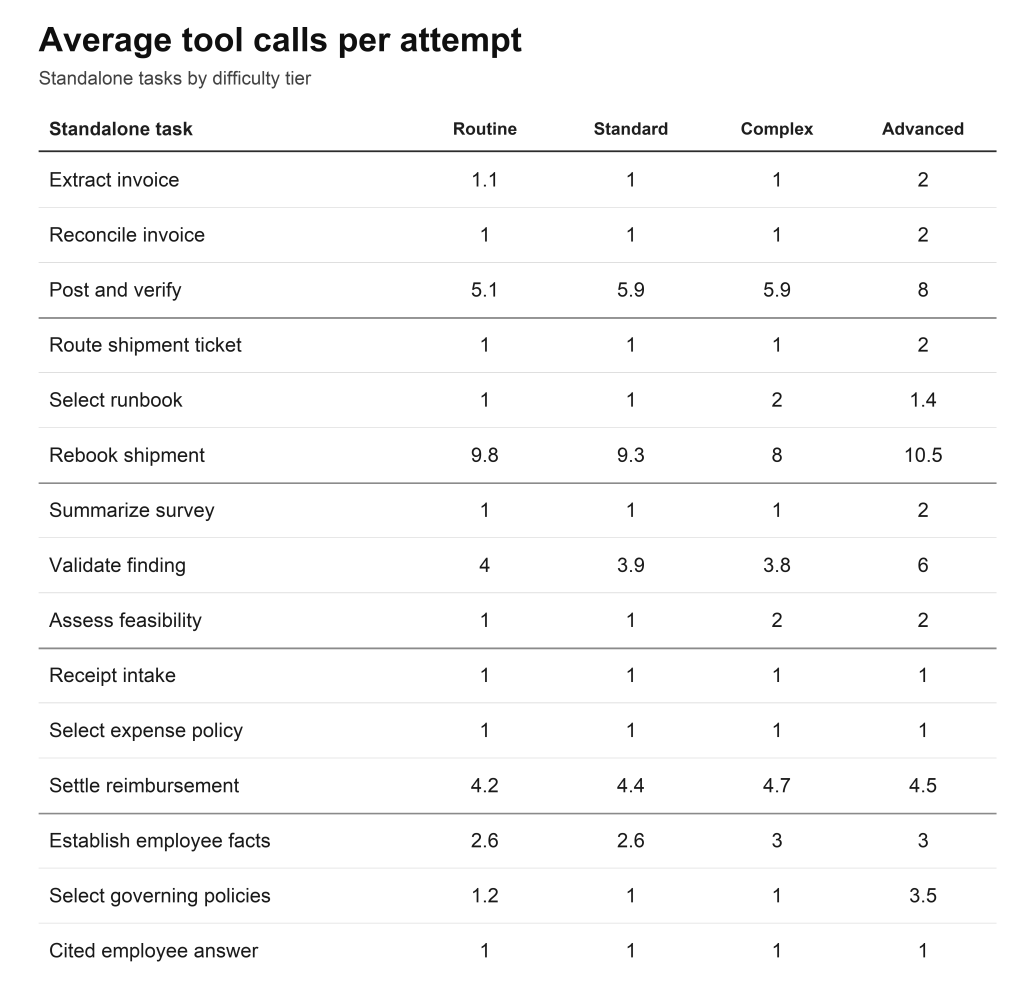
Average tool calls per standalone attempt for 15 tasks across four difficulty tiers.
The next table counts the model’s visible steps. If the model requests three tools at once, that’s one model step and three tool calls. The final answer counts as another model step. Routine rebooking averaged 9.6 visible steps. The trace doesn’t show the exact number of internal model calls.
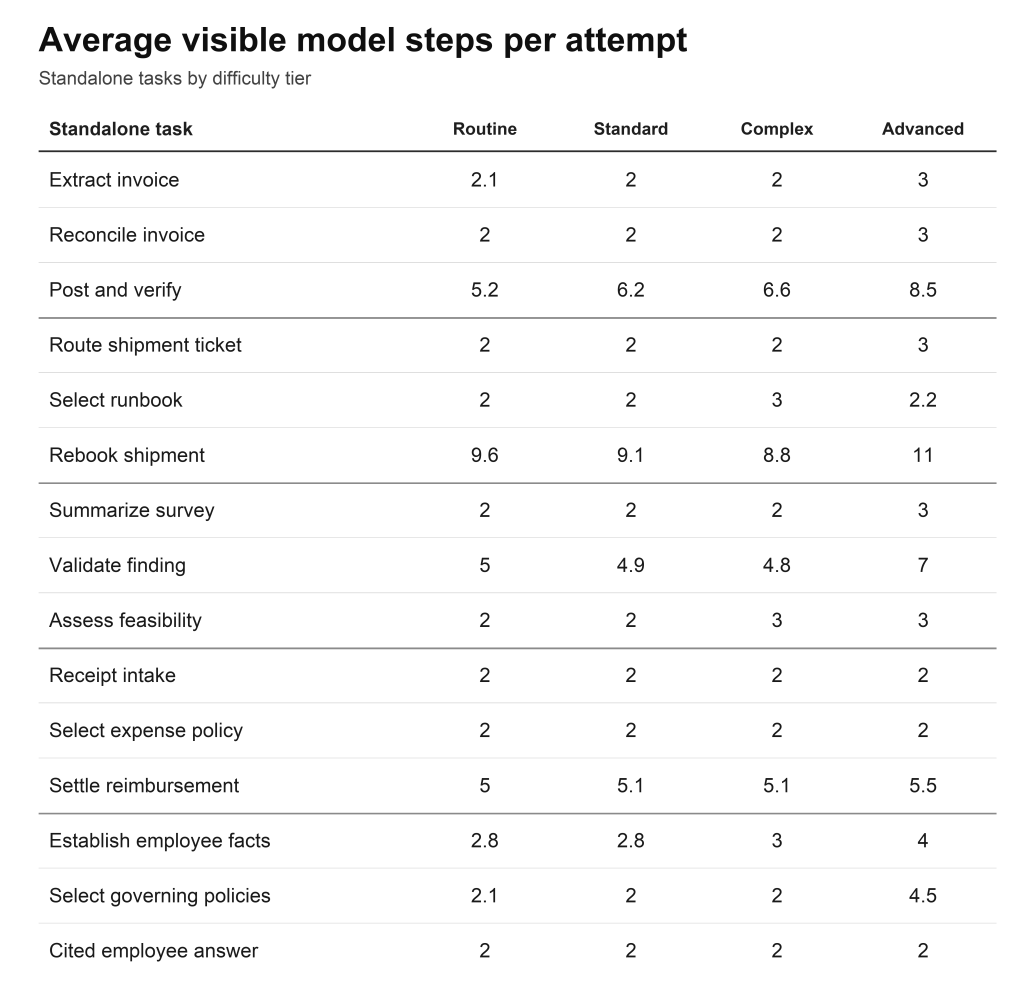
Average visible model steps per standalone attempt for the same 15 tasks and four tiers.
Call counts tell only part of the story. Routine and Complex invoice reconciliation each took one lookup because the purchasing system returned the records together. The Complex case still required the agent to apply a credit to the correct amended line.
Workflows: What changes when the tasks run together?
For a complete invoice, the agent starts with the supplier’s bill and finishes by checking the accounting records. The following costs include the handoffs.
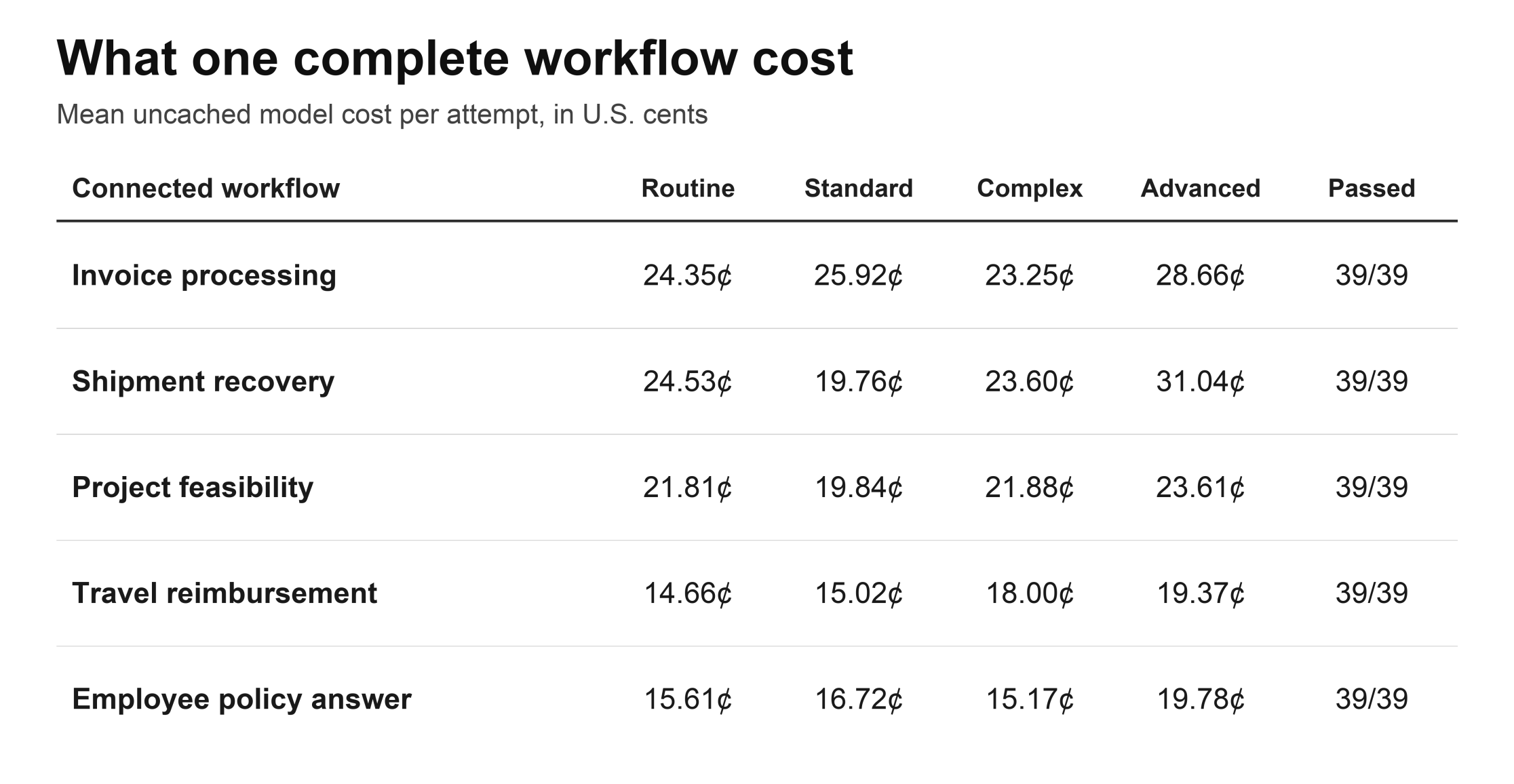
Connected workflow costs by tier. Each workflow passed 39 of 39 final attempts after review.
For a Complex invoice, the three standalone tasks totaled 21.40¢. Running them together cost 23.25¢. Most of that difference came from posting and verification, which rose from 13.64¢ to 15.38¢ when the agent had to work from the preceding task’s output. Use the connected rate when budgeting for that same workflow.
A cheap attempt can still leave a bill unpaid. During development, one agent identified an approved $135 but left the ledger empty. After the fix, all three reruns posted the amount exactly once and read it back. Across all four tiers, the final 39 invoice attempts passed and cost $10.05 at the study rates, or 25.78¢ per completed invoice for the test mix.
A failing grade also deserves a look. Across three reviews of 20 flagged attempts, eight met the criteria. One agent correctly required fresh approval after an invoice revision, but the grader rejected its wording. The ledger and approval record helped distinguish a missed payment from a grading error.
A budget for 10,000 invoices
Suppose the team expects 7,000 Routine invoices, 2,000 Standard, 800 Complex, and 200 Advanced. Multiply each count by its end-to-end rate and add the results. The monthly figures use the underlying rates before rounding.
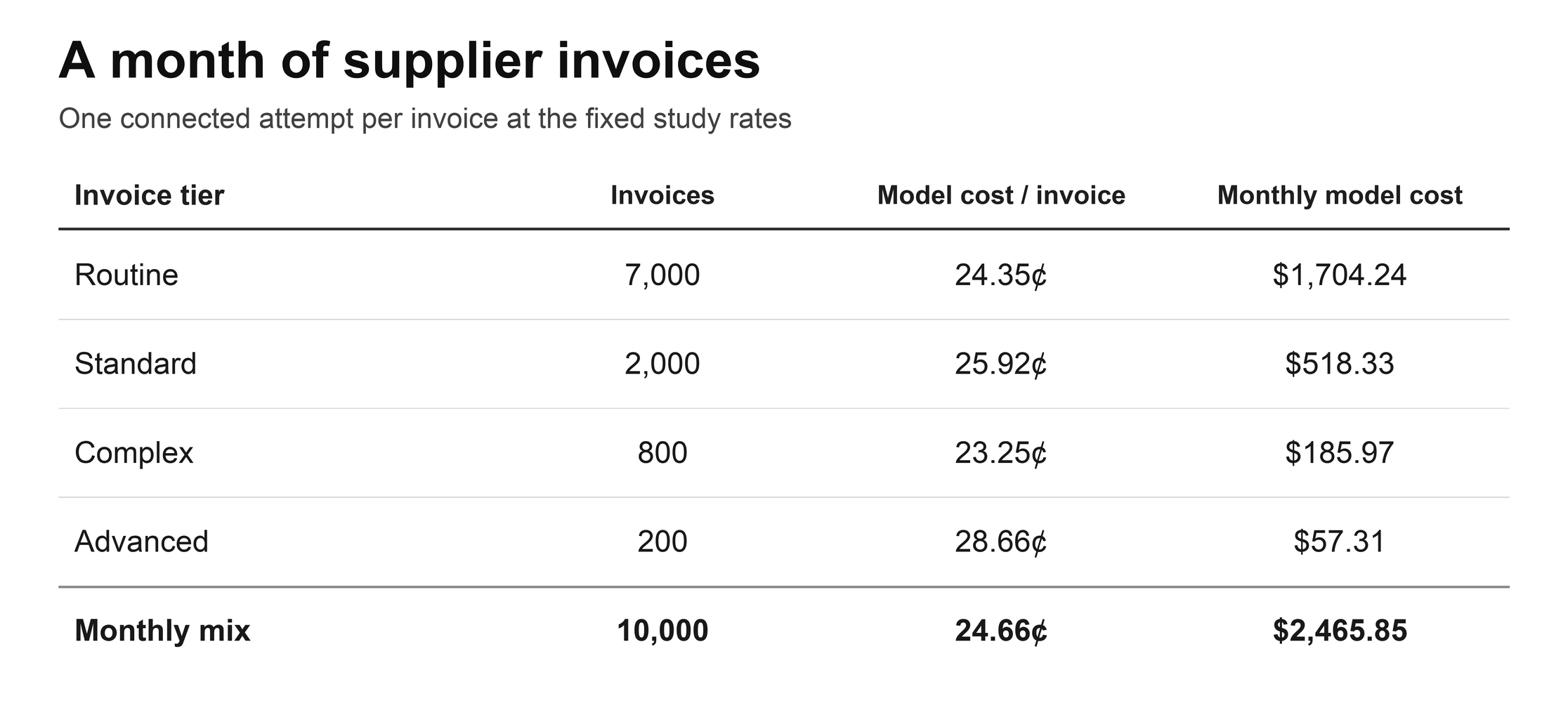
Monthly model usage for 10,000 invoices at the assumed mix.
One complete workflow attempt per invoice comes to $2,465.85 in model usage. If 5% of invoices also need six minutes of human review at $40 an hour, that adds 50 hours and $2,000, for a subtotal of $4,465.85. Each percentage point of additional review costs $400 at this volume. Retries, paid tool calls, and hosting would also count toward a production budget.
When an expense report can skip a step
A finance team expects 2,000 expense reports. Suppose 80% arrive with the governing policy attached. Every report needs receipt intake and settlement, but only 400 need a policy lookup.
The study measured each expense case end to end, including the cases that skipped the lookup. Multiply each case’s measured cost by its expected volume. The table groups those amounts by tier.
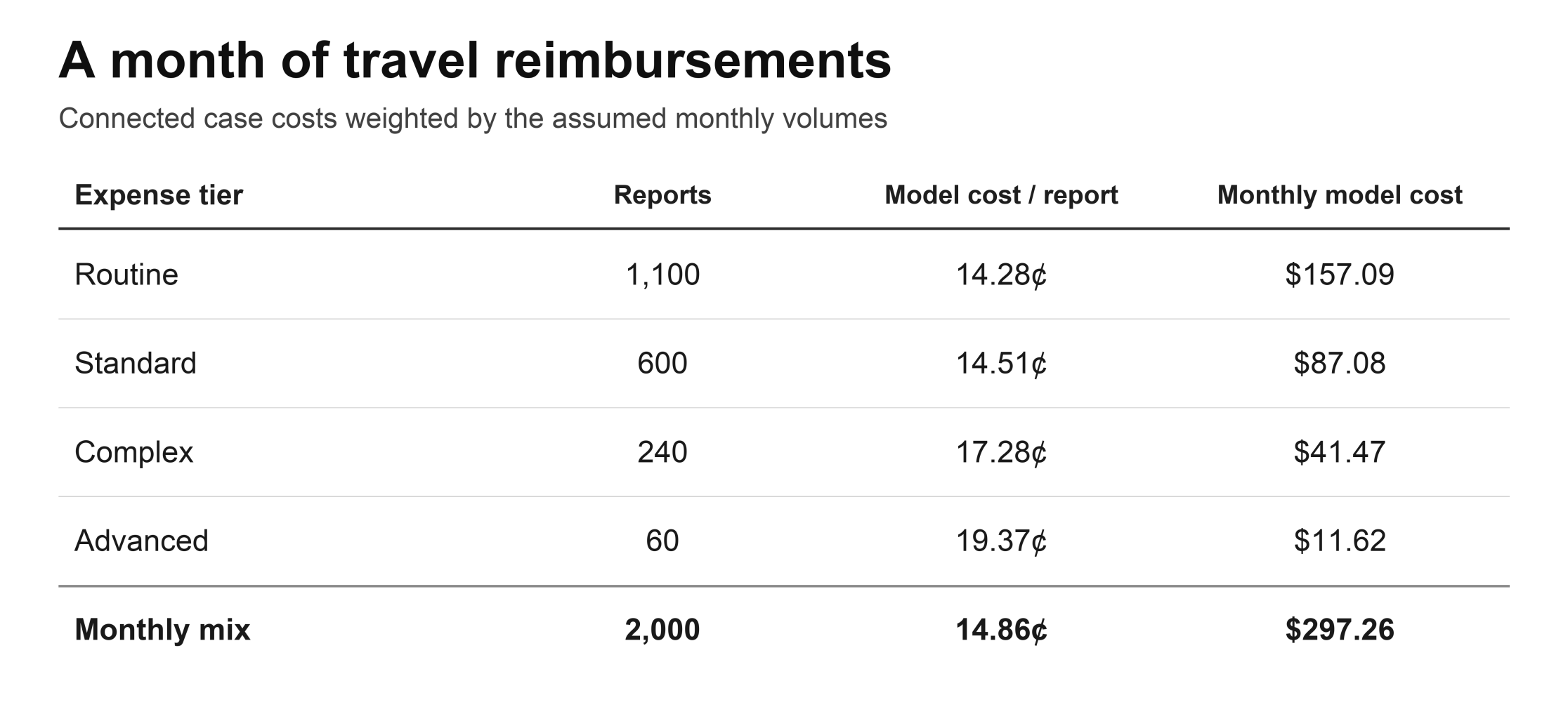
Monthly model usage for 2,000 travel reports, including 400 policy lookups.
That mix costs $297.26 a month, or 14.86¢ per report. The 39 benchmark attempts averaged 16.96¢ because they included a larger share of difficult cases. A finance team can price its own month by counting how often each path occurs in its expense register.
How to estimate a service desk you haven’t run
For a new workflow, estimate by analogy. A service desk can borrow measured rates from shipment routing, shipment recovery-guide selection, and project finding validation. The question is how closely each task resembles the work a technician actually needs.
Suppose 15,000 tickets need routing alone, 4,000 also need a troubleshooting guide, and 1,000 need routing, a guide, and an incident check. Choose a tier for each task separately. A ticket with an obvious owner can still require a second lookup to find the right guide.
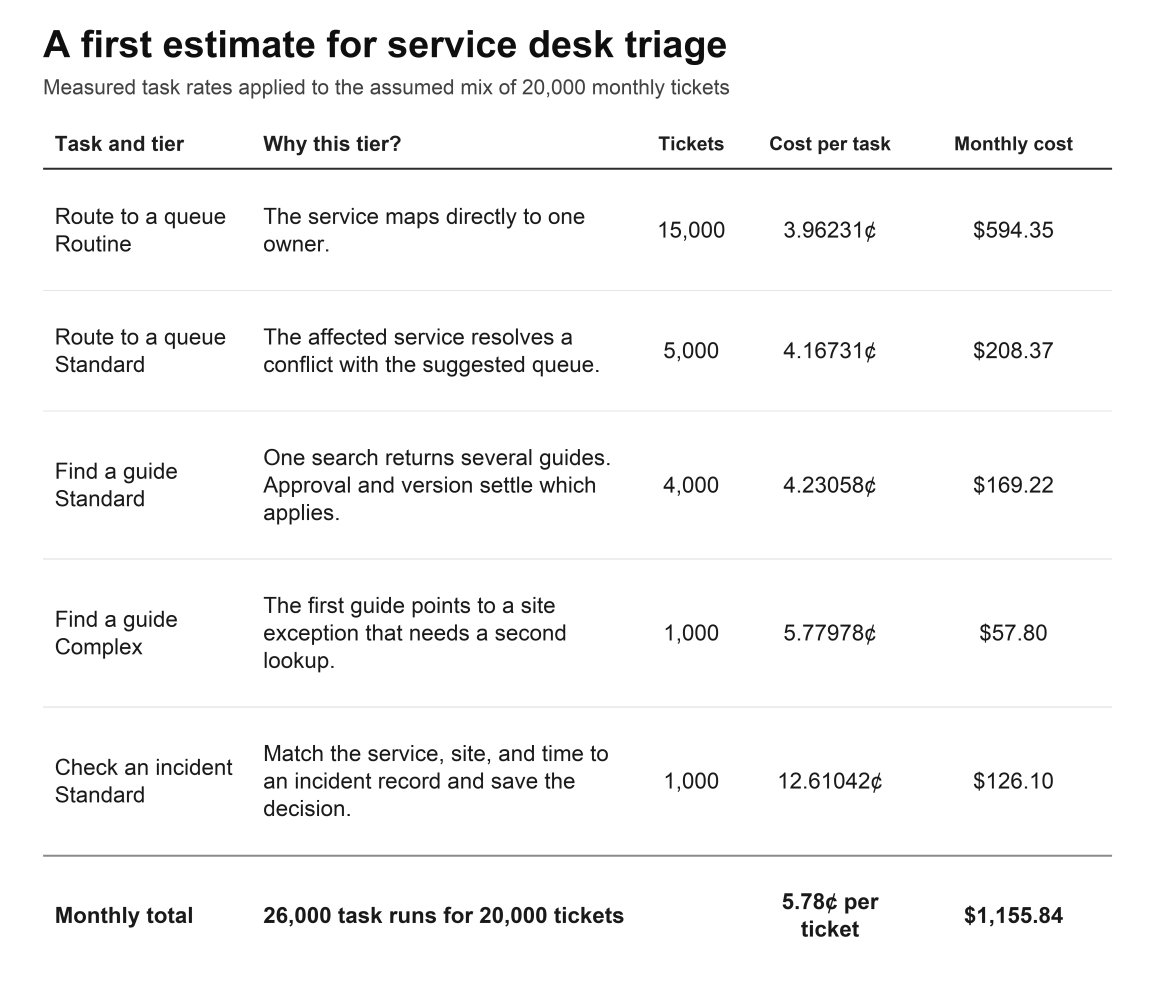
Service desk triage. Five task-and-tier estimates add to $1,155.84 for 20,000 tickets, or 5.78¢ per incoming ticket.
The monthly volume is 20,000 incoming tickets. Under the assumed mix, they trigger 26,000 task runs. For example, the 1,000 Complex guide lookups cost $57.80 at 5.77978¢ each. The five rows total $1,155.84 a month, or 5.78¢ per ticket in estimated model usage.
A penny matters at this volume. If the pilot costs $0.01 more per task run on average, 26,000 runs add $260 a month. The estimate rises to $1,415.84, a 22.5% increase. If only incident checks cost a cent more, the increase is $10.
To choose a comparable task, ask the people handling tickets what they must hand over, which records settle the decision, and what they verify. Then choose a tier. One direct lookup fits Routine. Choosing among records already in hand can fit Standard. Following a reference to resolve an exception can fit Complex. Reconstructing conflicting evidence over time may require Advanced.
Pilot the least certain match first. Here it’s the incident check. A ticket with a confirmed incident ID takes less investigation than one that could match several outages. Run historical tickets through to the technician’s handoff, check the queue, guide, and incident decision, and record what it cost to get them right.
Applying the method to another workflow
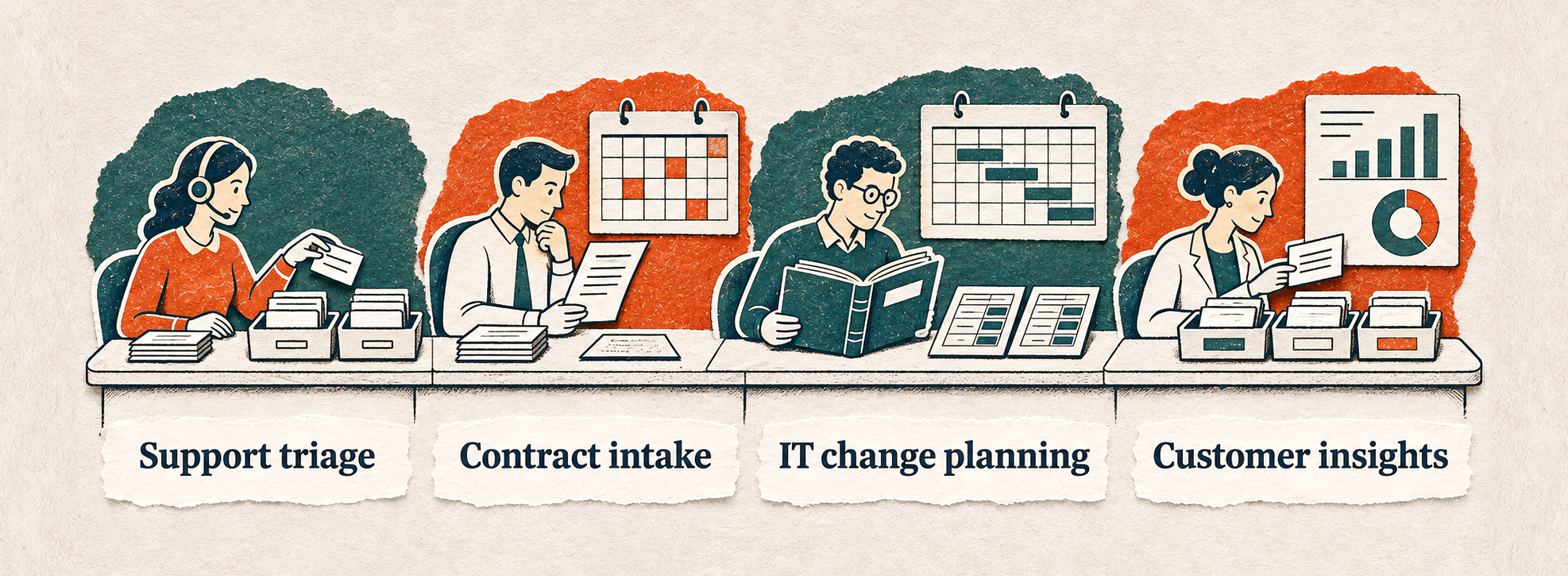
Four teams that can estimate AI work in units they already count.
Consider a contract renewal. A reviewer may have the governing terms in hand, or a signed agreement may point to a later amendment. The employee policy benchmark offers a rate for that specific piece of work. Selecting the governing policies averaged 4.96¢ per standalone Standard attempt and 7.92¢ per Advanced attempt.
Before borrowing either rate, open a few renewals with the person who signs them. Can the reviewer choose from the documents already on file, or does the first agreement determine what to retrieve next? The answer tells you which cases belong in each row of your estimate.
How AI costs change over time
As AI providers compete on price and release more efficient models, a published cost per task can quickly go out of date. The same goes for the rates in this article. Consider two changes a published average can miss. On July 30, 2026, OpenAI cut GPT-5.6 Luna’s API prices by 80%. The same tokens that had cost $100 at standard input and output rates now cost $20 on the same model. A newer model can also do the same work with fewer tokens. In one OpenAI comparison, GPT-5 used about 250 tokens to answer a simple command-line question. GPT-5.1 used about 50 tokens with both models set to medium reasoning.
If only token prices change, apply the new rates to your recorded usage. When testing a new model, define success up front and start at the lowest reasoning level it supports. If the model falls short, review the failures to see whether more reasoning would help. Compare settings on the same work.
Study details
The benchmark used GPT-6.2 Sol with medium reasoning. Each of the five workflows had 13 cases, three each at Routine, Standard, and Complex, and four at Advanced. Across 65 cases and three repetitions, 564 of 564 standalone attempts and 195 of 195 end-to-end attempts passed after fixes, reruns, and trace review. The optional expense lookup accounts for the smaller standalone count. A fresh sample is needed to measure production reliability.
The project incurred $89.76 in API charges from the earliest experiments through the final results, across 24,838 API requests and 181.7 million tokens. Based on logged usage, the 759 attempts retained for this study cost about $15.77 to run and grade, roughly 18% of the project total. About $11.30 went to running the tasks and workflows, and $4.46 to grading.
What would the same model usage cost at fixed rates? In the retained runs, 95.8% of the workers’ input tokens qualified for the $0.10-per-million cached rate. Pricing all input at $2 per million tokens and output at $10 per million gives $83.42 for the agents doing the work. That averages 7.40¢ per standalone attempt and 21.39¢ per end-to-end attempt. Grading is separate.
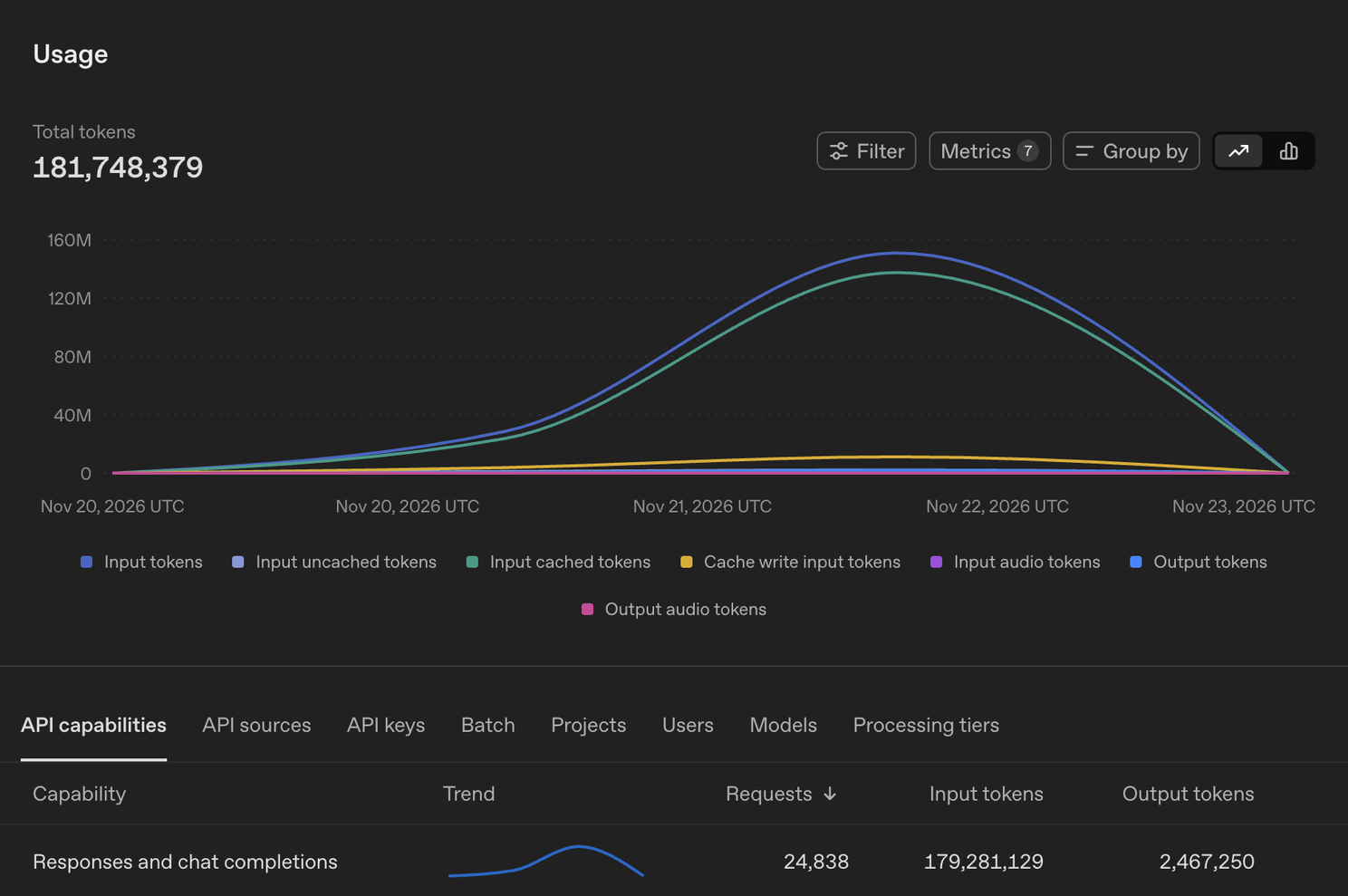
Token usage for the entire study, including project scoping and initial experimentation
Run the benchmark yourself
The benchmark source code on GitHub includes the cases, synthetic records, and graders used to measure all five workflows. To see what a passing result looks like, start with the workflow and task guide. It shows what each task receives, what it hands off, and how to tell whether the job finished correctly.
https://github.com/garystafford/workflow-task-estimate-benchmark
Follow the setup instructions in the README. You can validate the cases locally without an API key. To measure costs and pass rates with your own OpenAI API key, run one workflow (for example, npm run invoice) or all five with npm run all. Live runs and grading incur API charges.
Conclusion
You can estimate an AI workflow’s cost before you build it. Break the work into tasks, borrow rates from comparable work, and account for how often each task occurs. That estimate can tell you whether to run a pilot.
A pilot replaces those borrowed rates with your own cost per completed job. Add up what you spend on every attempt, including retries, paid tools, and human review. Divide by the number of jobs that meet your quality standard. With a sample that reflects the work ahead, you can use that rate to explain both what you expect to spend and how much work your team can expect to finish.
This blog represents my viewpoints, and not those of my past or current employers. All product names, images, logos, and brands are the property of their respective owners.
About the author
- Applied AI Engineer at OpenAI. I write about building AI applications, evaluating models, and turning experiments into practical solutions, drawing on my background in cloud architecture and software engineering.
Comments
Join the discussionBreaking budgets down per workflow task—like why rebooking costs noticeably more than simple routing—matches what we see in production. Token prices alone mislead teams when multi-step retries and human-escalation fallbacks silently double the actual cost per resolved ticket.